

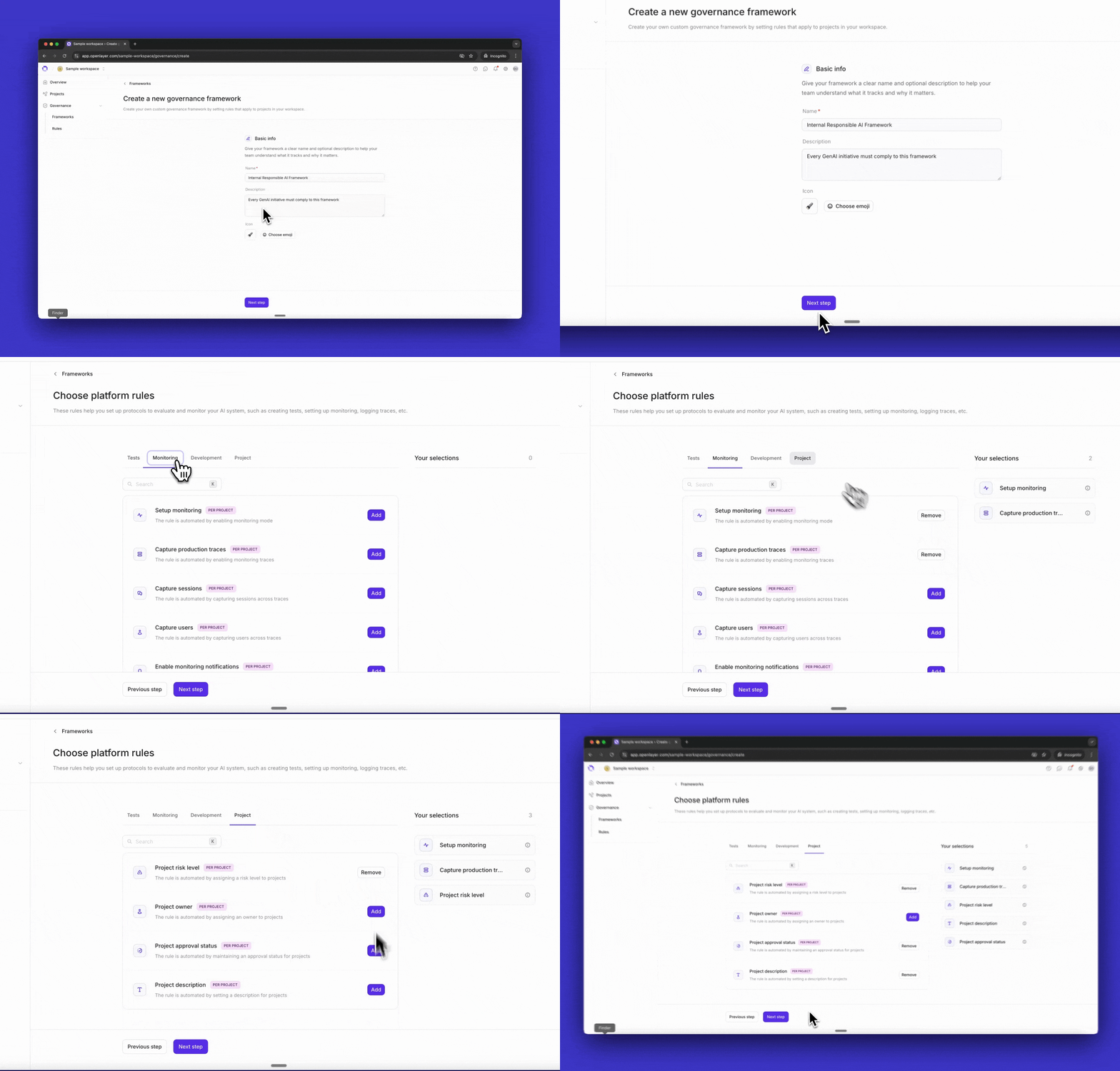
Navigate to Governance > Frameworks and then click Create framework.
You will be prompted to provide basic information: a name (e.g., “Internal Responsible
AI Policy”), an optional description, and an icon to help identify the
framework at a glance.
After naming your framework, the next step is to select the rules it should enforce.Openlayer has two types of rules: platform rules and evidence-based rules, and
you will configure each type in sequence.
Platform rules require teams to take actions within Openlayer to be compliant.For example, a platform rule might require enabling
monitoring mode and capturing production traces, or
running tests in CI/CD.Select the rules relevant to your framework; your selections appear in the sidebar as you go.
Evidence-based rules require teams to upload documents or provide links
as proof of compliance, such as security policies or model cards.Openlayer provides a library of common evidence-based rules, including AI use
case declarations, security guidelines, technical documentation, and
responsible disclosure policies.You can also create custom rules. Click New rule to define one with a name,
description, scope (workspace-wide or per-project), and renewal cadence for
policies that need periodic review.
Before finalizing, you’ll see a summary of your framework: its name,
description, and all selected rules grouped by type. Review everything,
then click Create framework.Your framework is now ready.The next step is applying it to projects and
tracking compliance.